
Insurance Settings for LTL Services
To enhance the customer shipping experience and safeguard high-value commodities, Cabo includes a built-in option to add third-party insurance directly from the booking page. Reps can customize insurance pricing in two ways:
Insurance Margin and Minimums
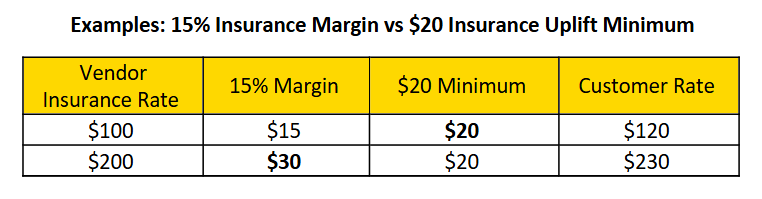
The most common approach is to set both a margin and a minimum charge.
- Insurance margin adds a percentage to the insurance provider's quoted amount. This percentage is set by the customer's sales rep.
- The insurance uplift minimum is the dollar amount charged on top of the insurance provider's quoted amount if the insurance margin does not meet or exceed this minimum.
ℹ️Adjust Insurance Settings for Competitiveness. If a competitor wins the quote when insurance is included, consider lowering the insurance margin or minimum to stay competitive (while keeping your overall shipment margin intact).
Setting Insurance Margin and Minimum:
Navigation: Customer > LTL > Preferences > Billing > Rates & Insurance
- Enter your desired Insurance Margin.
- Enter the Insurance Uplift Minimum .

When updating the insurance margin and/or minimum, click Update Rates and Insurance to save your changes.

Default Freight Insurance Amount
For some customers, it may be more appropriate to charge a default flat rate for insurance. To configure this, navigate to Customer Account > LTL > Preferences > Shipments.

ℹ️ Use this method when a consistent, predictable rate is needed—something your customer can budget for and expect on each shipment.