
Volume LTL Rates
Each carrier establishes its own rules regarding maximum linear footage and cubic capacity, as outlined in their respective tariffs. When a shipment exceeds these limits, the carrier’s standard LTL pricing no longer applies. In such cases, Cabo will provide volume rates (sometimes referred to as spot rates), which are determined by current market conditions. These rates can vary significantly between carriers and even from one shipment to another.
Identifying Volume LTL Rates
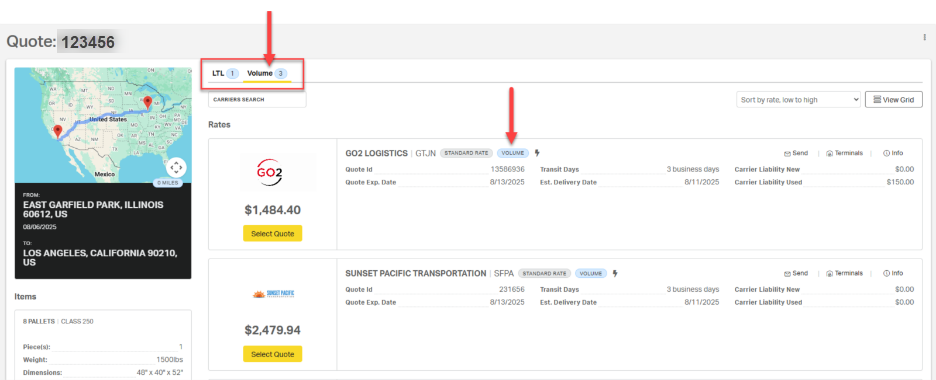
When looking at a specific LTL quote in Cabo, volume rates provided, or “returned,” by carriers appear in a separate tab beneath the page header. A volume tag will also be displayed in the rate details of each carrier’s quote.
Setting and Adjusting Volume Rates in Cabo
To enable volume LTL rates, users must complete actions in two areas of Cabo:
- Customer LTL Preferences: Toggle volume quoting ON.
Navigation: Customer > LTL > Preferences > Quotes - Carrier Settings: Set the volume margin and minimum.
Navigation: Customer > LTL > Carriers
⚠️ Both settings must be enabled before volume rates are provided.
Disabling Volume LTL
Navigation: Customer > LTL > Preferences > Quotes
To prevent volume LTL rates from being returned during quoting, toggle the Volume setting to OFF.
Note: When Volume is disabled, Cabo will no longer provide carrier volume rates even if a shipment exceeds linear foot or cubic capacity limits.

Setting Volume LTL Margin and Minimum
Navigation: Customer > LTL > Carriers
1. To receive volume LTL rates from a specific carrier, toggle on the VL LTL Enabled option.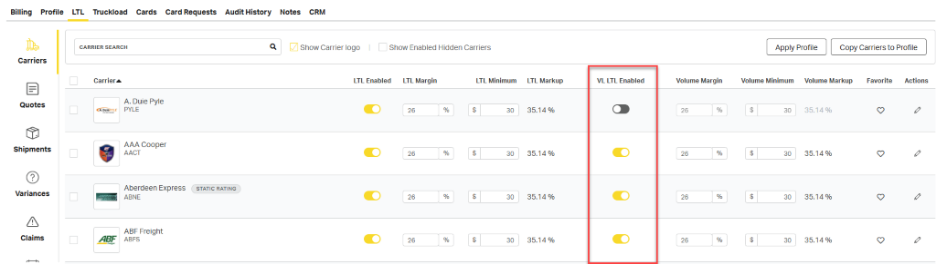
ℹ️ Volume rates (also referred to as spot quotes) for enabled carriers will appear on the Volume tab of the LTL Rates page, but only for shipments that meet each carrier’s service criteria, such as lane coverage, available capacity, and carrier-specific rules like weight limits, cubic capacity, linear feet, and overlength restrictions.
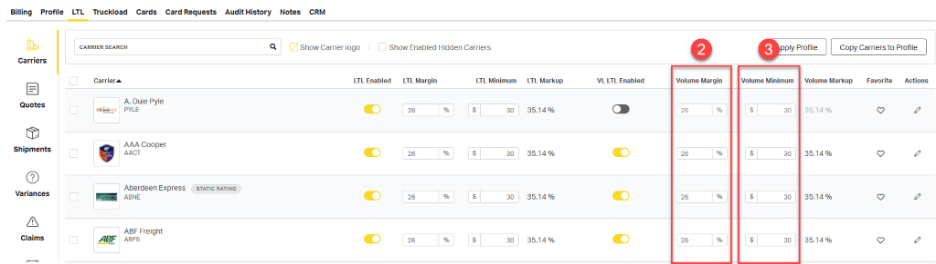
2. Set the Volume Margin (%): This percentage will be added to all volume LTL shipments.
3. Set the Volume Minimum ($): If the calculated volume margin is less than this set minimum amount, the minimum will apply instead.
Using Bulk Actions
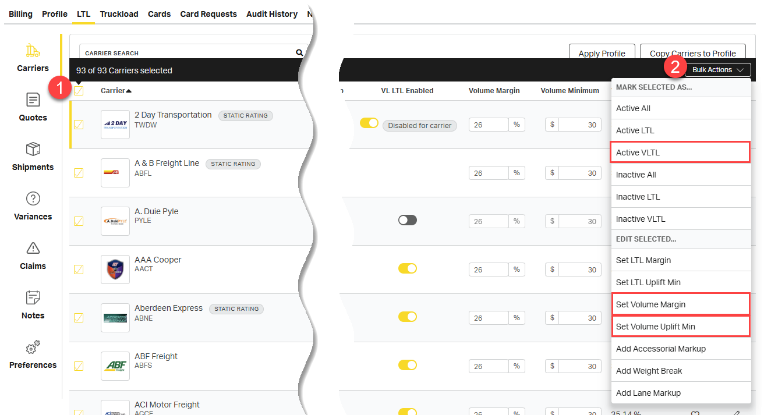
Use bulk actions to apply volume rate settings across multiple carriers at once.
- Select the checkbox next to each relevant carrier.
- On the resulting submenu, open the Bulk Actions drop down and select the desired action.
Understanding Margin vs Minimum Rates
Margin pricing adds a percentage-based profit (e.g., 30%) to the carrier’s rate, while minimum pricing ensures a fixed minimum profit (e.g. $300). Margin pricing is flexible and scales with the size of the shipment. Minimum pricing protects the bottom line by guaranteeing a baseline profit, which is especially useful when carrier rates are low.
| Pricing Method | Carrier Rate | Profit Added | Final Price |
| Margin (30%) | $500 | $150 | $650 |
| Minimum ($300) | $500 | $300 | $800 |
In the example above, minimum pricing yields a higher final price and profit than margin-based pricing.
In the examples below, the Volume Margin is set to 30% and the Volume Minimum is set to $300. Cabo applies the $300 minimum to the two lower-cost shipments, ensuring baseline profitability, while applying the 30% margin to the two higher-cost shipments where the margin exceeds the minimum.
| Carrier Volume Rate | $500 | $750 | $1,200 | $2,000 |
| 30% Margin | $175 | $263 | $420 | $700 |
| $300 Minimum | $300 | $300 | $300 | $300 |
| Profit Applied | Minimum | Minimum | Margin | Margin |
| Customer Rate | $800 | $1,050 | $1,620 | $2,700 |